Monday 14 September 2020

Seedboxco.net Review

13:42 Posted by Jurgens Krause , , 2 comments

 Regardless of why you need one, there are so many Seedbox hosts available that it is becoming increasingly difficult to find the right one for your needs.


I recently signed up for a seedbox from seedboxco.net, and was pleasantly surprised by their offerings. The first thing that stood out to me was the very competitive pricing.


I signed up for the cheapest option, which is already more than I need, with I price that I have not seen beaten by anyone else.

What truly sets Seedboxco's seedboxes apart though is their "AppBox"concept:
With your Seedbox account you get access to a number of App Slots, which you can use for anything ranging from a basic hosted torrent client all the way to a cloud based Minecraft server. Other options include a functional Ubuntu Destktop Environment with VNC support, a PLEX Server, VPN Server or a wordpress site.

To get an app up and running is as simple as a couple of mouse clicks, and within minutes you are up and running.

I used my slots for a Transmission client, paired with an Ubuntu instance which I used to run all the scripts to clean up my downloads and Sync them to my local server, which is something you usually have to pay extra for.

App Installation Screen

I have dealt with a few other seedboxes in the past, in while the App concept might not be as intuitive as traditional seedboxes, it makes up for it by it's sheer versatility.

The last thing that stood out for me was the quick response times to technical queries. I had a few issues initially adapting to the App environment, but the staff were always quick and capable in resolving my problems.

All in all, I can highly recommend Seedboxco.net for your next seedbox


Stay tuned for a post on how I set up scripting on my seedboxco server to automate all my downloads!

Thursday 8 February 2018

Windows 10 - ATI Radeon Xpress 1150

07:20 Posted by Jurgens Krause , , , , , , 12 comments
I just spent the last 3 hours trying to get a working driver for an ATI Radeon Xpress 1150 installed on an old Dell Inspiron running Windows 10-64bit.

None of the links on discussion blogs seem to work anymore, and the WDM only driver from AMD did not actually contain any driver (as far as I could tell)

Monday 11 September 2017

Monday 14 August 2017

Downloaded Youtube content on Plex

08:40 Posted by Jurgens Krause 2 comments
My internet provider gives me uncapped data at night, but severely capped and throttled during the day. For this reason, I like to download some videos from YouTube and then make them accessible on my Plex server. This is especially handy for my wife, who loves a certain popular exercise channel.

Whatever your reason for putting YouTube videos on your Plex server, this is a handy guide to getting those videos on the server easily accessible.

Tuesday 16 May 2017

Saturday 18 March 2017

Friday 17 March 2017

Friday 10 March 2017

Bypass Origin Region Blocked "On the House"

12:26 Posted by Jurgens Krause , , , , , , , No comments
When I checked my usual news and gaming update sites, I found out that EA was giving away Syberia II for free. So I opened up Origin, and found that the On The House game remained "Theme Hospital" which I have already claimed, and am in the process of trying to finish.


I thought I had missed the free window, but then I discovered that Syberia II was not even on the Origin store in my home country. So I decided to see if I could claim it by using a proxy. Lo and behold, it worked! Read on for instructions on how to claim it.

Wednesday 8 March 2017

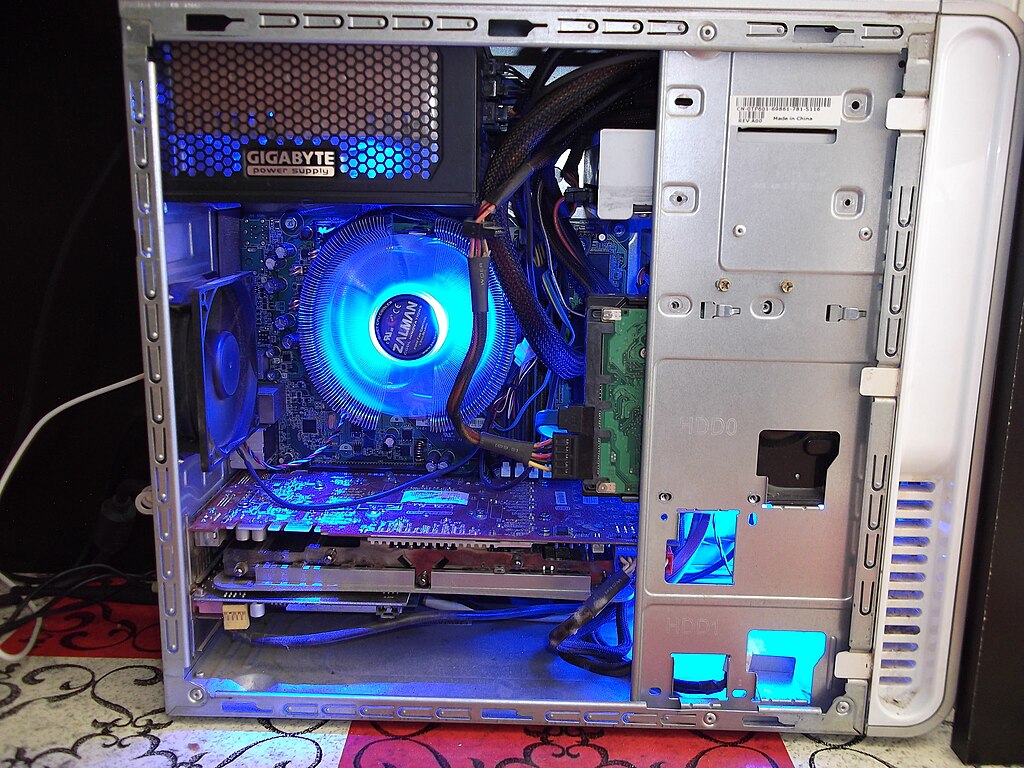
Building a budget gaming PC using second hand parts

06:50 Posted by Jurgens Krause , , , , , 13 comments


Having a top end gaming PC is every PC gamer's dream, unfortunately, not everyone can shell out over 1000USD just for a CPU alone. Luckily, for less than 500USD you can build yourself a PC from high end, used components, capable of playing most of today's AAA titles at medium settings, with a clear upgrade path to reach the top of the pile.

Tuesday 15 November 2016

Friday 23 September 2016

Wireless Desktop Streaming Showdown

Setting up a user friendly, seamless and reliable projecting system can me a daunting and expensive process. I will be looking at a couple of major options, weighing their strengths and weaknesses, and hopefully help you to choose which one is right for you.


I will be taking a closer look at the following products:

Microsoft Wireless Display Adapter
Airtame Wireless HDMI dongle
Chromecast
Apple TV
Windows 10 Desktop Streaming
Airserver

Wednesday 15 June 2016

Hidden Object Giveaway - Ends 22/06/2016

07:32 Posted by Jurgens Krause , , , 34 comments
To celebrate the stellar growth of this blog, I am giving away one copy of each of the following games, one entry per person. One game per win:


To enter, simply leave a comment on this page with youremail [at] yourdomain.com
Please note that these are Steam keys, so you will need a Steam account to redeem them.

Wednesday 8 June 2016

Responsible Volunteering

06:38 Posted by Jurgens Krause , , , 4 comments


There has been a growing movement advocating against sending volunteers, especially short term volunteers to work at orphanages in third world countries. Many well meaning individuals support this trend by re-posting and the signing of petitions, but I believe there is more to this than is immediately apparent.
They cite a number of factors as motivation, most of which are right on the money, but I fear that they may be throwing out the baby with the bathwater.

Saturday 14 May 2016

Importing OVA container into Proxmox (Step-by-Step)

10:32 Posted by Jurgens Krause , , , 9 comments
OVAs are an industry standard, and many appliances are distributed as such. Unfortunately Proxmox does not yet support OVA importing in an easy, user friendly way.

After downloading the OVA you will need to get it on to your server. My preferred way is by using WinSCP, if you are using Linux or OSX, you can use command line scp to do the transfer.


  1. Start up WinSCP and select "SCP" as the file protocol.
  2. Enter the Host name, User name and Password for your Proxmox server.
  3. Click yes
  4. At the security key warning, click "Yes"
  1. In the right hand pane, navigate to /tmp 
  2. Drag and drop the file you want to upload into the tmp folder
Depending on your network and the file size, this step may take a while.

Once the file has been uploaded, connect to the Proxmox server using Putty or your favourite ssh client.

Change into the /tmp directory:
cd /tmp

Extract the OVA file:
tar -xvf *.ova

This should output a couple of files from the OVA container, it should include an OVF file, which is the VM Defenition file, and a VMDK file, which is the actual hard disk image. Again, this may take a while.

Convert the vmdk to a Proxmox compatible qcow2 file:
qemu-img convert -f vmdk RADIUSdesk-2016-4-0-disk1.vmdk  -O qcow2 qcowdisk.qcow2

Run the following command, substituting the correct ovf filename, to get the vm settings:
cat RADIUSdesk-2016-4-0.ovf | grep -e "Memory RAMSize" -e "CPU count" -e "Netw" -e "Disk"

Using the settings from the above command, set up a new VM using the Proxmox web interface, you can make a tiny hard drive, since we will overwrite it.

Run the following command to overwrite the newly created disk image with the one we converted earlier. Remember to substitute the correct filenames:
mv qcowdisk.qcow2 /var/lib/vz/images/115/vm-115-disk-1.qcow2

You can now start the new VM with the imported disk image.

Lastly, remove all the files we created in temp by using "rm filename" for each file.

Job done!!

Friday 29 January 2016

Tuesday 12 January 2016

Linux Directory Copy

07:53 Posted by Jurgens Krause , , , , No comments
Easy to use, easy to forget

Copy directory and subdirectories
The -R flag is to signal a recursive copy

cp -R source-dir dst-dir

Note that this will place source-dir/* in dst-dir. If you want to place source-dir/* in dst-dir/source-dir/* you must use the following command:

mkdir /dst-dir/source-dir
cp -R source-dir dst-dir/source-dir

If you want to move all directories to sub-directory, in case you used the wrong command above, use the following:

mv !(subdir) subdir


Thursday 7 January 2016

Lenovo Energy Management - (Plugged in, not charging) Solved

The last time I reinstalled my Lenovo Y50-70 with Windows 10  64-bit, I ran into the following problem:


The laptop is plugged in, but the battery is not charging beyond 60%.

This is due to the fact that I had enabled "Conservation Mode" in the Lenovo Energy Manager in the previous Windows 8.1 installation. The problem is that the Energy Manager is not available under Windows 10.

To fix the problem:

  1. Navigate to the drivers page for your notebook on the Lenovo Website.
  2. Select "Power Management" as the component
  3. Select Windows 8.1 as your Operating System
  4. Download and install the driver

The software should install without issue, at least in my experience.

Open the Lenovo Energy Manager, you will see that the current status is "Conservation Mode" this causes the battery not to be charged full in order to prolong the battery life expectancy


Click on the menu button in the top right corner, and navigate to the "Settings" tab.

On the settings tab, disable conservation mode:

Your battery should now charge to 100%

Thursday 22 October 2015

Asterisk Wideband Music on Hold

15:24 Posted by Jurgens Krause , , , , , , , , , No comments

The default music on hold included with Asterisk leaves somewhat to be desired, and getting high quality replacement music in the correct formats can be a challenge. I have not managed to figure out how to convert to G722, but you can easily convert to the native Asterisk SLN format with the following commands:

Monday 5 October 2015

Multiple PPPoE Connections on Ubiquiti AirOS

09:40 Posted by Jurgens Krause , , , 4 comments
Sometimes you need to push your available hardware and software a little bit beyond their original specifications. Because AirOS is built on Linux, you actually have a fair bit of flexibility in order to do whatever you like.

I had a need to be able to run multiple PPPoE accounts on the same antenna for two reasons. Firstly, when I need to separate VoIP traffic from Data traffic, and secondly when I have two users behind the same antenna. I then use VLANs to route the traffic independently.